Each year I work with a cohort of teachers interested in the Hour of Code. We work through three to four types of coding and then their culminating activity is to host an Hour of Code event on their campus. Last year we had six teachers complete the cohort and activity.
The first week we explored Unplugged Coding or coding without technology. We learned about and explored programming, debugging and more all without a tech device!
The next week, we explored four different web-based coding programs. This allowed for differentiation as well as a wide variety of experiences.
The final week, we explored Code.org and set up classroom accounts.
We will be wrapping up our cohort by hosting Hour of Code events in classrooms as well as on campuses. Stay tuned for Hour of Code events updates!
Showing posts with label coding. Show all posts
Showing posts with label coding. Show all posts
Friday, November 4, 2016

Friday, October 7, 2016
#OKCPS Hour of Code Cohort
“Computer Science is a liberal art: it’s something that
everybody should be exposed to and everyone should
have a mastery of to some extent.”
— Steve Jobs
The Hour of Code is a movement around the world to help every student have the opportunity to learn about computer science. Code.org provides lesson guidelines for the Hour of Code/Computer Science Education Week.
Computer Science Education Statistics
According to Computer Science Education Week, there are almost 2,000 open computing jobs in Oklahoma, but we only had 411 computer science graduates. 71% of new STEM jobs are in computing and 8% of STEM graduates are in Computer Science.
According to Code.org, there are 1,319 teacher accounts and 54,798 student accounts across Oklahoma.
Let's start teaching computer science to not only engage students but also allow them to have an employable skill upon graduation.
Hour of Code Cohort
All OKCPS teachers are invited to participate in our cohort which has a culminating activity of create and Hour of Code project in your classroom or on your campus. Check out THIS flyer for more information. The three sessions will be Unplugged Coding, Code.org and new this year, Scratch.
Saturday, October 3, 2015
9.28.15 - What I'm Seeing this Week in Classrooms!
This post is about all of the random cool things I am seeing in classrooms around the district.
On Tuesday, I started my day at Pierce. I saw GoNoodle and quite a few brain breaks. Brain breaks are a great opportunity to get students moving and are a nice way to transition from one activity to another.

Also this week, my blog post about Part 2 of 5: Hour of Code Series was posted. This week consisted of learning to code with Code.org and then setting up your class in Code.org to have students start coding.
As I visited another school, 5th & 6th grade students were practicing their Google Search skills as they researched and learned about Jamestown.

Then I stopped by school to follow up with a few teachers and found more students using technology. My favorite room was the nonverbal special education class where students were using the SMART board and switches to take assessments.

Anything is possible! What a great week! I love my job!!!
Wednesday, September 16, 2015
Unplugged Coding!
I've started a 5 part coding series to assist teachers learn more about coding as well as how to teach coding. Part 1 was recently held and we began with unplugged coding or coding without technology or devices.
You can checkout my original post, titled Unplugged Coding...No Devices Required, on the OKCPS ETS blog.
We had the opportunity to experience one activity about programming and debugging and a second activity about deadlocks. All of the teachers were excellent and engaged participants.
We all had a blast and will continue with teaching with Code.org soon!

Thursday, January 29, 2015
Educational Technology Learning Challenge
Whoa...what is an Ed Tech Learning Challenge??? This is a series of tasks, or challenges, presented to staff members. The participants learn how to use and integrate new technologies in the classroom.

This semester I am working with one elementary campus over 12 week. We started out working through the SAMR model using ipads. Next we moved to Google Drive and now we are working with SMART Notebook and SMART Boards. We just completed week 6 this week. The next 6 weeks will include flipping, coding, project based learning, social media and more ipads.

The conclusion of the challenge will be a peer showcase so we can all show what we learned and how we customized it for our classroom and students.This campus has a great staff and is a joy to work with every week!


This semester I am working with one elementary campus over 12 week. We started out working through the SAMR model using ipads. Next we moved to Google Drive and now we are working with SMART Notebook and SMART Boards. We just completed week 6 this week. The next 6 weeks will include flipping, coding, project based learning, social media and more ipads.

The conclusion of the challenge will be a peer showcase so we can all show what we learned and how we customized it for our classroom and students.This campus has a great staff and is a joy to work with every week!

I will post more after the peer showcase. There will be some amazing sharing at that time!
Monday, May 5, 2014
Ed Tech Update #1
So, I'm not a big blogger or writer but a friend convinced me to blog about how I use tech in the classroom. Here goes nothing!
First, I love coding and second graders love coding. Since we do not have a BYOD policy and are not 1:1, this is how we roll! We use Daisy the Dino & I give them tasks such as "Make Daisy moonwalk." The students then figure it out using their critical thinking caps... or trial & error. Once it's figured out they record it in their journals. They also love to assign tasks to each other.We do this as whole group or in small groups depending on the time we have available.
We have experimented with Hopscotch and a few of my kids are successful at Hopscotch, but Daisy the Dino works the best.
Below is a picture of us working on coding as whole group as well as a picture of a journal in progress.
We have experimented with Hopscotch and a few of my kids are successful at Hopscotch, but Daisy the Dino works the best.
Below is a picture of us working on coding as whole group as well as a picture of a journal in progress.


Friday, May 2, 2014
April 28 - May 2, 2014...Ladybugs & Butterflies
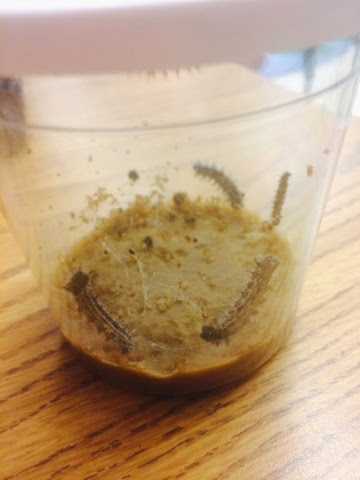
This week we started our butterfly unit by ordering caterpillars from Insect Lore to watch them become butterflies. We started by learning about the life cycle as well as some key terms...aka vocabulary words! We then made our first observation of them as caterpillars.


In math we have been rocking fractions. We sorted fractions, then made a flip flap chart and the kids are excelling at fractions. YES!!!

I also attended a professional development about coding in the classroom. I feel like everyone does what I do in the classroom, but I was proven wrong again this week. My students love Daisy the Dino. I give them task such as, " Make Daisy walk backwards to the sun. Then touch the sun and walk back forwards." We then record our program code in our journals, since you cannot save them. I love coding, even in 2nd grade. All of my students have shown success in coding.

We started our ABC Countdown to the end of school. This week we celebrated A Day with a butterfly art project. Then B Day was bubbles. C Day was Career Exploration using The Career Zoo website. D Day was donuts and E Day was a Science experiment with mentos and diet coke. I cannot wait until next week!


We started the week by reading The Very Hungry Caterpillar. We also used popplet to create a visual organizer of the items eaten during the week. We also read many other butterfly books.
In math we have been rocking fractions. We sorted fractions, then made a flip flap chart and the kids are excelling at fractions. YES!!!
I also attended a professional development about coding in the classroom. I feel like everyone does what I do in the classroom, but I was proven wrong again this week. My students love Daisy the Dino. I give them task such as, " Make Daisy walk backwards to the sun. Then touch the sun and walk back forwards." We then record our program code in our journals, since you cannot save them. I love coding, even in 2nd grade. All of my students have shown success in coding.
We started our ABC Countdown to the end of school. This week we celebrated A Day with a butterfly art project. Then B Day was bubbles. C Day was Career Exploration using The Career Zoo website. D Day was donuts and E Day was a Science experiment with mentos and diet coke. I cannot wait until next week!
Subscribe to:
Posts (Atom)